
IBM i Encryption Masking and Scrambling
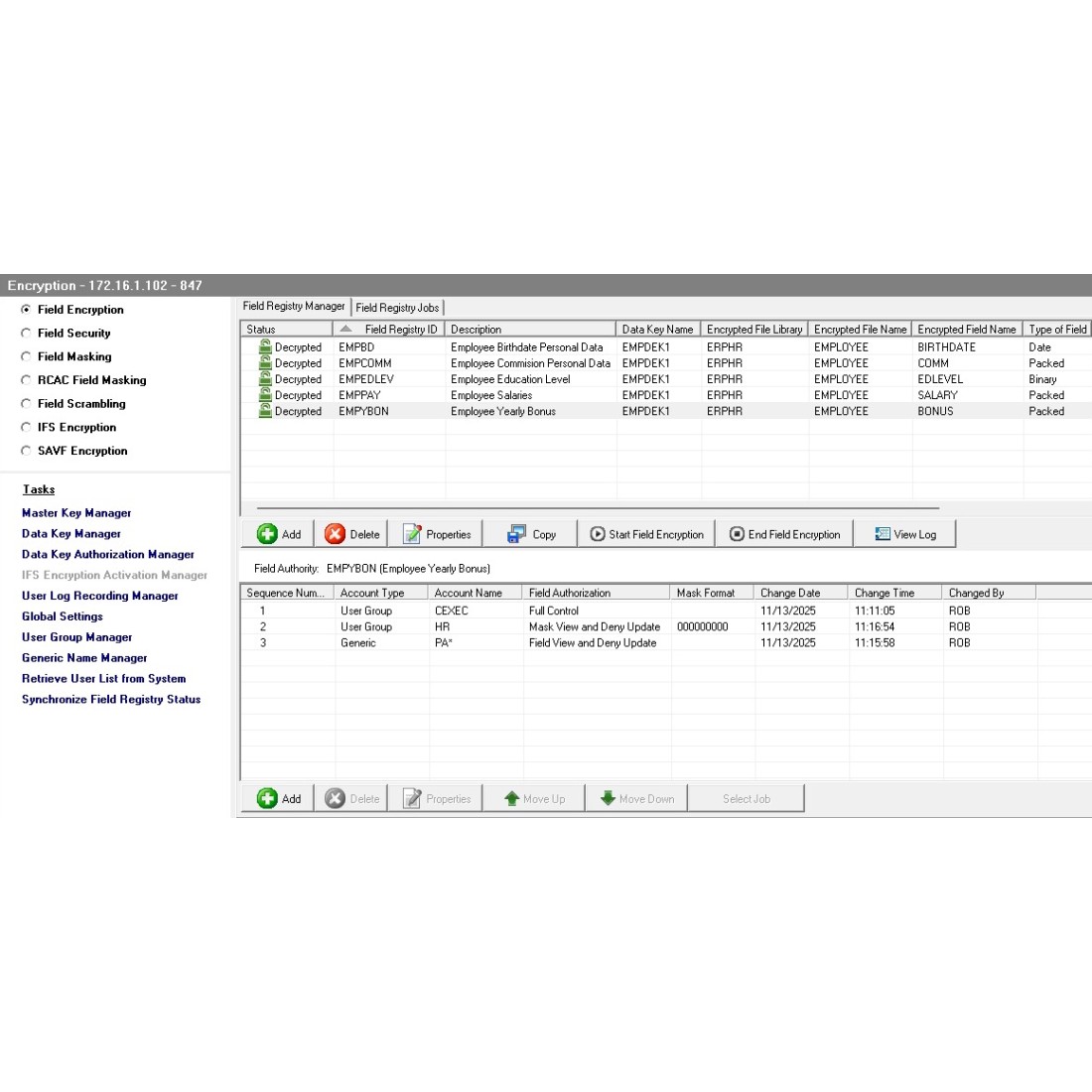
IBM i Encryption, Masking and Scrambling product provides a quick and simple way to protect sensitive IBM i DB2 database fields and files from unauthorized access using AES encryption, and just as important, ensures data at rest is always protected, no matter where the data is resting. Database and file encryption solutions are one of the most common methods for protecting data at rest compliance requirements. For other IBM i security and data protection requirements, customers may also use the products Field Security, Field Masking, Field Scrambling, RCACS Field Masking, IFS Encryption and Save File Encryption features.
The IBM i Encryption, Masking and Scrambling product is a very flexible and comprehensive data protection solution, of which encrypting multiple fields can be implemented in 6 simple steps.
1. Create a Master Key
2. Create a Data Key
3. Designate Data Key Managers or use Auto Generated Key Strings
4. Define Field Encryption Properties for fields that requires protection
5. Define User Field Authorities
6. Press Start Encryption button
The IBM i Encryption, Masking and Scrambling product makes extensive use of the IBM i FIELDPROC, which is a database column level exit point made available with DB2 for i. Since the IBM i FIELDPROC exit point is implemented directly in the DB2 database, customers do not need to modify their applications or database. The encrypted field value remains the same data type as the original field, and it replaces the original field in the file. Once the encryption is activated for a field, the original value is replaced with an encrypted value in all records of the file. The time it takes to complete encrypting all records of the file will vary greatly, and subject to many factors, including: programming used to retrieve the data, number of files, number of fields, number of records in the file, system performance capabilities, resources available at the time, types of fields being encrypted, Field Authorities being used, and other variables.
IBM i Field and File Protection Options Explained
Field level Encryption is the strongest data protection method and is the only data protection method that protects data at rest. Encryption further protects the delivery of the data using defined Field Authorities. Decryption of fields is done automatically according to the permissions the administrator defined for the users or groups of users. When authorized users access fields in an encrypted state, decryption is temporarily applied to the field as it passes from the database to the application. The decryption will occur only if the user has the required authority, otherwise encrypted values will be passed to the user’s application.
Field Level Encryption: allows IBM i administrators to choose from many different encryption algorithms for both alphanumeric and numeric fields, which will prevent unauthorized users from viewing data, no matter where the data is stored or how the user attempts to access the data. If preferred, administrators may use an API for encrypting and decrypting strings.
At this point in time, the following IBM i Native and SQL field types are supported for encryption: PACKED, ZONED, BINARY, CHARACTER, HEXADECIMAL, OPEN, DATE, TIME, TIMESTAMP, GRAPHIC, DECIMAL, NUMERIC, SMALLINT, INTEGER, BIGINT, VARCHAR, CHARACTER-O and VAGRAPHIC. Other field types may be added based on customer requirements. You can use the Display File Field Description DSPFFD command to identify the data types of your files to determine if the field types you wish to encrypt are supported.
A user’s Field Authorities determine how decrypted data will be displayed to users you have authorized to view the data in the fields. Field Authorities can be granted based on User IDs, Group Profiles, User Group Lists, *ALL and Generic Profiles using wildcards, such as ERP*, HR****01, etc. There are no best practices for determining or defining user field authority. You should apply the security based on organization’s requirements or if none exist, use your best judgement. The data is obviously sensitive, so the likely best approach is to limit exposure to unencrypted data as much as possible. Therefore, the majority of your users will most likely not need any field authorities, which will result in these users seeing the encrypted data. Presenting the encrypted data has no bearing on system performance and delivery speed.
Field Authorities options for authorizing users to view decrypted data
Full Control: The ‘Full Control’ Field Authority means that users with this authority can see the decrypted data. Full Control Field Authority performs one simple function for users; it displays the decrypted field values to the user when passed to the requesting program. Since Full Control performs only one function in presenting the data, it has the least impact on performance. If the user updates the record, the new field value will be re-encrypted before updating the database.
Field View and Deny Update: The ‘Field View and Deny Update’ Field Authority works the same way as Full Control. Users with this field authority can also see the decrypted field value when passed to the requesting program, however if the user’s program attempts to update the record, the job will be interrupted and halted.
Mask View and Allow Update: When a user with ‘Mask View and Allow Update’ Field Authority accesses an encrypted field, it is first decrypted and then masked according to the mask defined, before being passed to the user’s requesting program. If you want the users or groups of users to view the last 4 of a social security number, then a mask is applied to the other five numbers. If the user’s program updates the record, the new field value will be re-encrypted before updating the database. Key fields cannot use the Mask View and Allow Update Field Authority option.
Mask View and Deny Update: The Mask View and Deny Update Field Authority functions the same as Mask view and Allow Update Field Authority, however, if the user’s program attempts to update the record, the job will be interrupted and halted.
Scrambled View and Allow Update: When a user with ‘Scrambled View and Allow Update’ Field Authority accesses an encrypted field, it is first decrypted and then scrambled according to the selected algorithm defined, before being passed to the user’s requesting program. If the user’s program updates the record, the new field value will be re-encrypted before updating the database.
Scrambled View and Deny Update: The Scrambled View and Deny Update functions the same as the Scrambled View and Allow Update Field Authority, except if the user’s program attempts to update the record, the job will be interrupted and halted.
For database fields that do not require data to be protected at rest, customers may use any of the other data protection methods: Field Security, Field Masking, Field Scrambling and RCAC Field Masking. These IBM i security and data protection methods do not make any changes to the database and only protect data upon delivery to the user’s screen, also known as on the fly data protection. Of these four IBM i data protection options, RCAC Field Masking is the only one that does not use the IBM FieldProc exit program. All four of these IBM i database security features are faster than using IBM i Field Encryption. If your organization is not required to use encryption and not concerned about protecting the data at rest, one of these four data protection features are an option. Full or partial masking of any IBM i field type is supported. For numeric fields, customers may choose to scramble data, which is beneficial to environments that need data for developing and testing their applications.
Field Security
Since the data is not encrypted, masked or scrambled, Field Security should deliver the fastest processing time of all the IBM i data protection mechanisms that use IBM FieldProc exit program. At this point in time, the following IBM i Native and SQL field types are supported for encryption: PACKED, ZONED, BINARY, CHARACTER, HEXADECIMAL, OPEN, DATE, TIME, TIMESTAMP, DECIMAL, NUMERIC, SMALLINT, INTEGER, BIGINT, VARCHAR and CHARACTER-O.
Field Masking
IBM i Field Masking also does not protected at rest, as the field remains unchanged in the database. Field Masking simply controls how the field is displayed (on the fly) according to the user’s Field Authority. Field Masking also causes data retrieval to be slower, because it uses IBM FieldProc exit program every time the field is processed, however it is faster than Encryption. At this point in time, the same IBM i Native and SQL field types are supported as Encryption, except DATE, TIME and TIMESTAMP are not supported for IBM i Field Masking.
Field Scrambling
Data is not protected at rest, as the field remains unchanged in the database/file. This mechanism simply controls how the field is displayed (on the fly) according to the user’s Field Authority. Field masking also causes data retrieval to be slower, because it uses IBM FieldProc exit program every time the field is processed, however it is faster than Encryption. At this point in time, the same IBM i Native and SQL field types are supported as Encryption, except DATE, TIME and TIMESTAMP are not supported for IBM i Field Scrambling.
RCAC Field Masking ‘Row Column Access Control’
IBM i FCAC Field Masking also does not protected at rest, as the field remains unchanged in the database. RCAC Field Masking Field Authority is the only IBM i data security feature that does not utilize the IBM FieldProc exit program. Although it too only controls how the field is displayed to the user, providing on the fly data manipulation according to the defined Field Authority. RCAC Field Masking is faster than the other IBM i data protection mechanisms. At this point in time, the same IBM i Native and SQL field types are supported as IBM i Field Encryption, and it also supports the additional BOOLEAN field type. Just like Field Security, Masking and Scrambling, DATE, TIME and TIMESTAMP are not supported for RCAC Field Masking.
Other field types may be added based on customer requirements. You can use the Display File Field Description DSPFFD command to identify the data types in your files to determine if the field types you wish to encrypt are supported.
Save File Encryption
Object encryption for save files add the ability to encrypt and save entire libraries as well as individual objects, of which commands allow integration into backup processes. A series of commands allows easy integration of Enforcive Save File Encryption into backup processes, ensuring backup data at rest on tape media is always protected or on disk and other locations remains protected at all times.
Role-based Key Management
IBM i Encryption, Masking and Scrambling product offers flexible key management, based on two-tier encryption. At least one master key is required to generate data keys, ensuring strict separation of powers, between those who generate the keys and those who use them. As an additional measure of security, the master key is used to encrypt each data key, which is used in the encryption algorithm. Organizations have the option to store the data keys on the IBM i, on a remote IBM i or in another server environment. Encryption keys can be assigned to users or groups of users based on roles. Alternatively, encryption key strings can be auto-generated strings so that not even the administrator knows the key string values. There’s no limit to the number of encryption keys that can be created and used. An administrator may use a different encryption key for every field, whether the fields are in the same file or not. Encryption keys are only required for IBM i Field Encryption, Save File SAVF Encryption, IFS File and Directory Encryption. Encryption Keys are not used with IBM i Field Security, Masking, Scrambling or RCAC Field Masking features.
HA and DR Compatible
IBM i Encryption works in high availability environments without any special measures being taken. Any High Availability or Disaster Recovery target databases will be identical to the production source, and will contain the master and data keys needed to encrypt and decrypt the data.
Product Summary of Benefits
Data Protection - Encryption adds a vital layer to the security of an organization’s sensitive data, preventing even the most power users from accessing data in fields that require limited access.
Application Independence - Field Encryption has been engineered to minimize impact on mission critical applications that could be impacted by the encrypting and decrypting processes. Existing database file structures remain unchanged, so organizations typically do not need to modify any programs.
GUI client allows security officers who are not necessarily “green screen” experts to easily implement, manage and monitor the protection of sensitive data.
Commands can be run from green screen for maximum flexibility and ease of use.
Compliance requirements such as requirement 3 of the PCI Data Security Standard that specify organizations must protect stored cardholder data can be very quickly and easily accomplished. The database encryption is the most powerful and foolproof data protection mechanism that is universally accepted and PCI approved standard.
The allocation of keys to users is integrated into the included user management module, as is the Key creation designation.
All changes to encryption configurations are logged by a central auditing facility in a DB2 database of the local IBM i, and can be reported on using the optional Report Generator. Event logs can be optionally forwarded to a SIEM or SYSLOG Server for integrating with external tools.